
MigraMemo

Coming soon

A private migraine diary for iPhone and Android

The migraine diary that works mid-attack.

Log an attack in seconds. Get a quiet heads-up before sharp barometric drops. Your migraine history stays on your phone.

Take the tour

Coming soon to the App Store and Google Play

  • No account
  • On-device diary
  • One plan, everything included
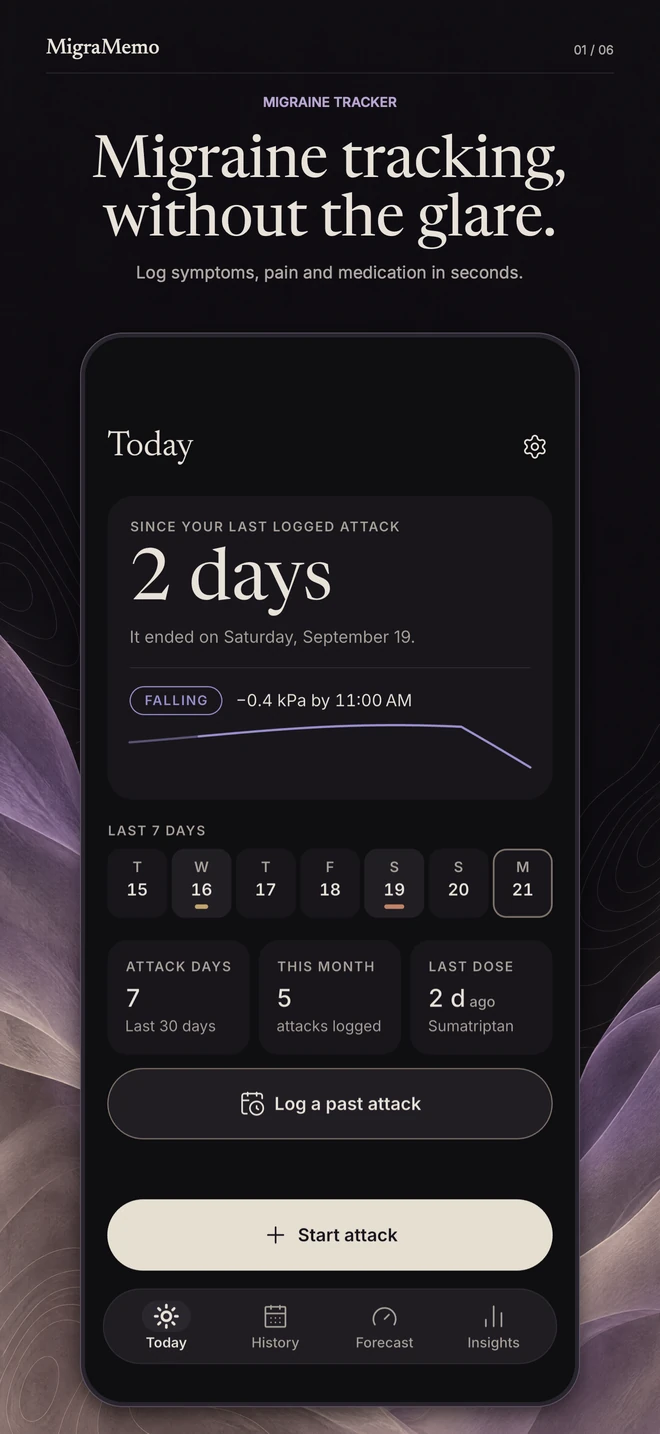
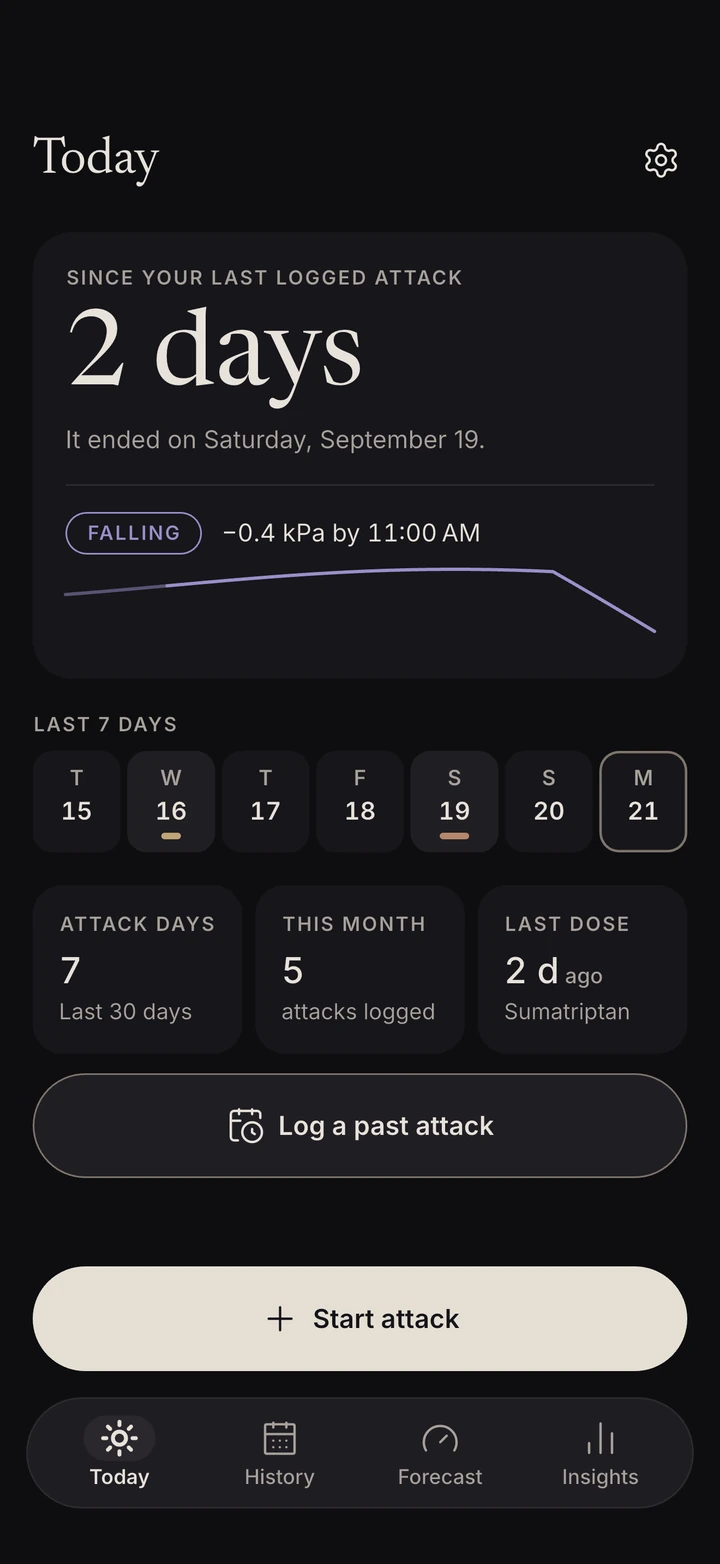
MigraMemo’s Today screen: 2 days since the last logged attack, pressure falling 0.4 kPa by 11:00 AM, the last seven days, stat tiles for attack days, attacks this month and last dose, and buttons to log a past attack or start an attack.
The Today screen. Real app, demo data.

Built to use mid-attack

MigraMemo is a migraine diary built for the moment you actually need it — when the light hurts and you can barely look at your screen.

One dark, low-glare screen. Huge tap targets. No typing required.

The app

Everything you log, shown back to you.

Every screen on this page is the real app, running on demo data.

In the moment

Log an attack in seconds

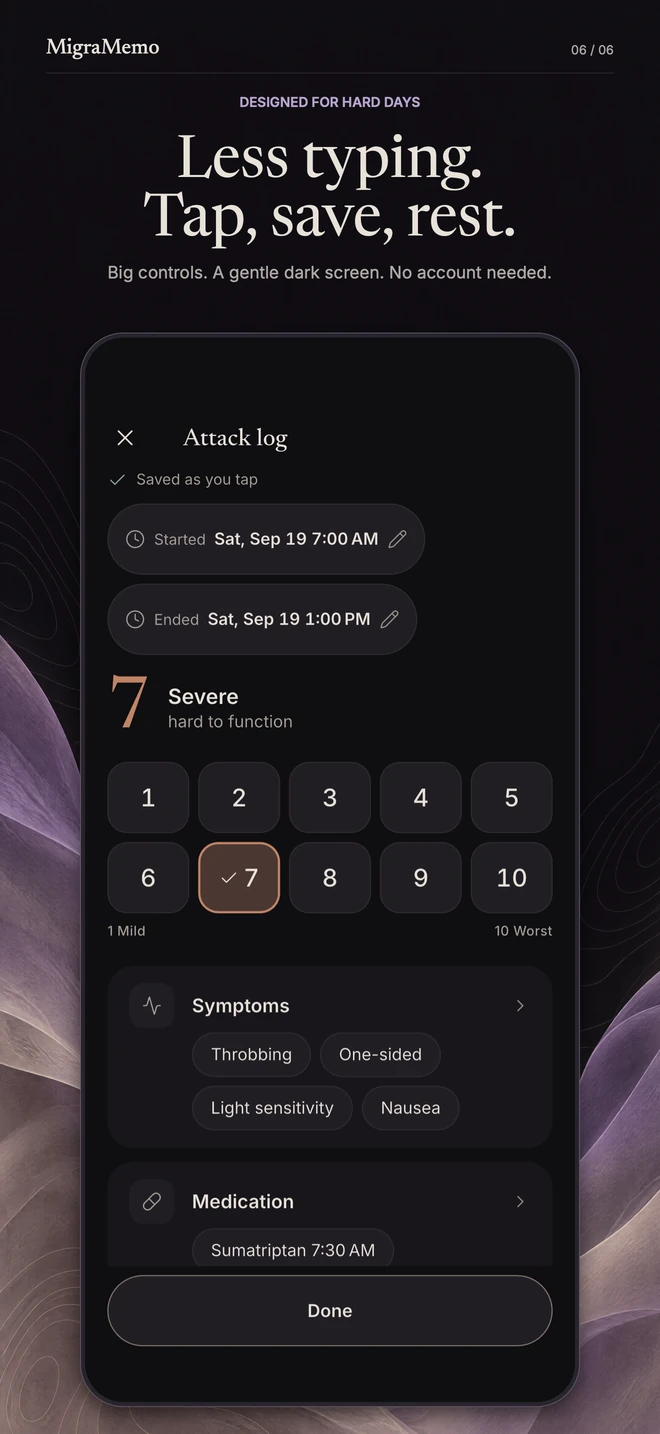
Start an attack with one tap, tap a number from 1 to 10 for how bad it is, tap the symptoms you feel and the medication you took.

  • Saved as you tap. Everything saves the instant you tap it, so closing the app never loses anything.

  • Forgot to log in the moment? Add a past attack in two taps.

  • Rather talk than type? Hold to dictate a note — it is turned into text on your iPhone and never recorded. iPhone
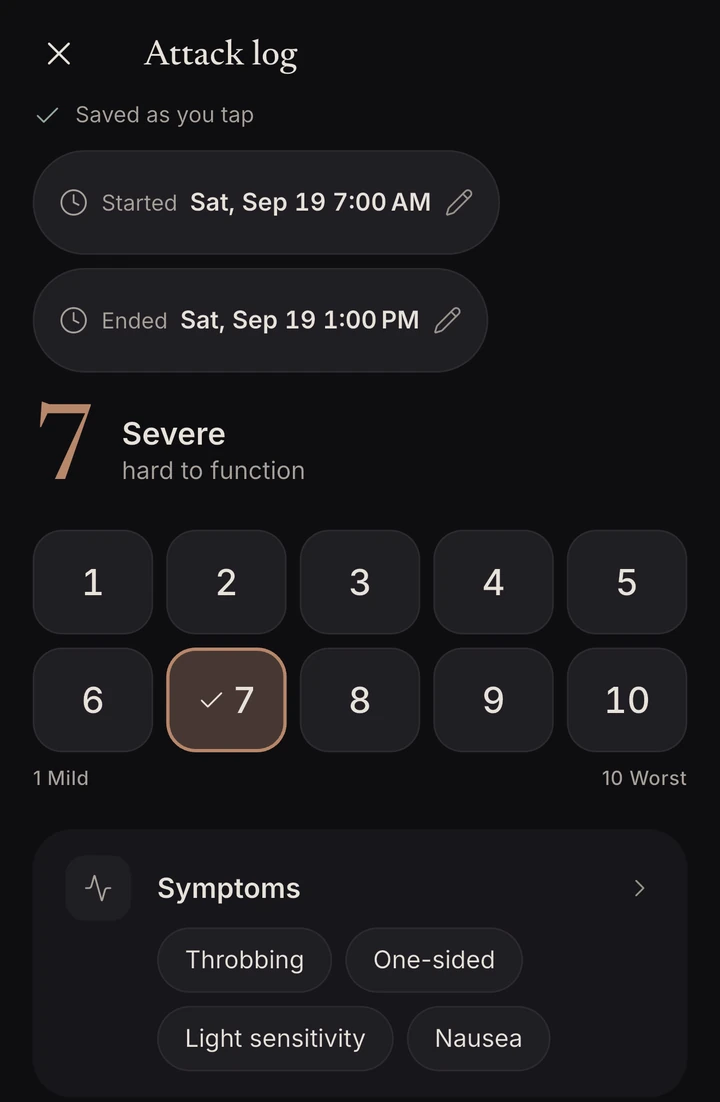
The attack log, saved as you tap: start and end times, severity 7 of 10 marked Severe, hard to function, on a grid of tiles from 1 Mild to 10 Worst, and the symptoms Throbbing, One-sided, Light sensitivity and Nausea.

Afterwards

See what actually worked

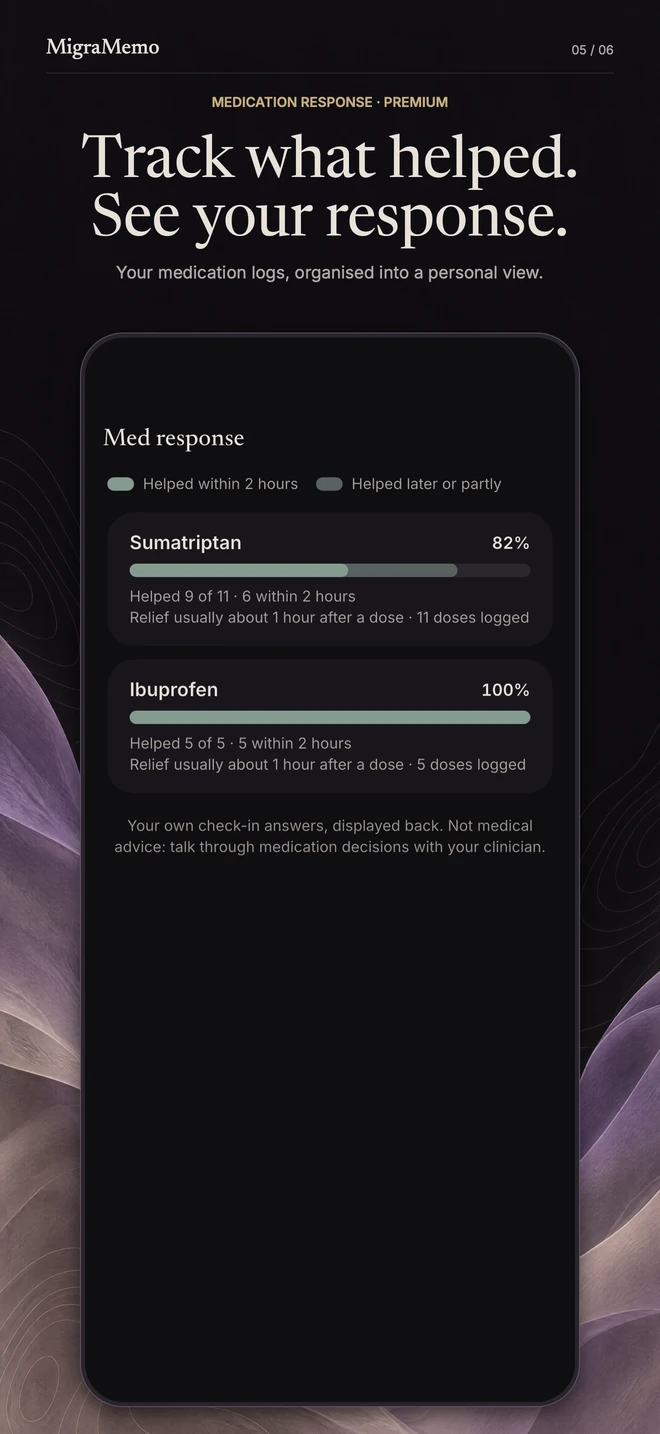
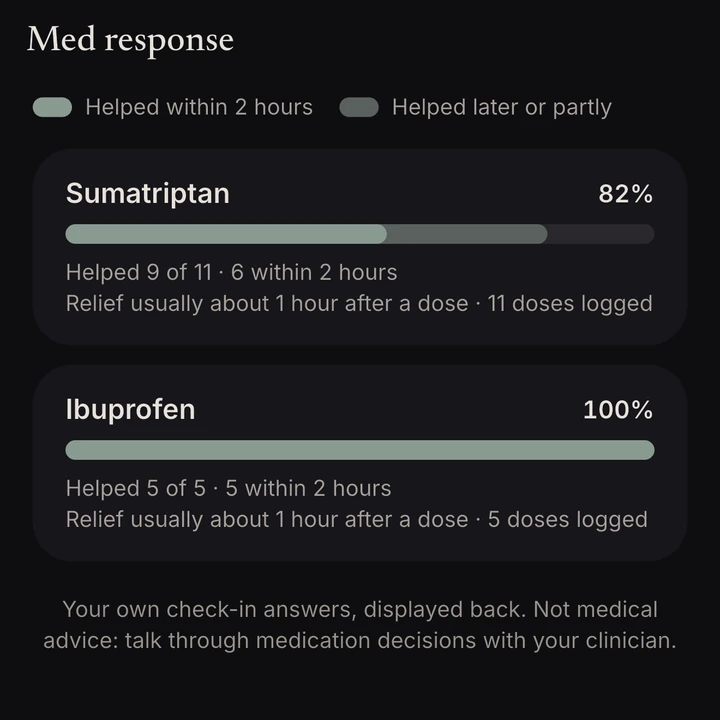
After each dose, MigraMemo asks one quick question: did it help? Over time that becomes your own medication response picture — how often each medication helped, how often it worked within two hours, and how fast relief usually came.

  • Built only from your own diary entries
  • Calculated on your phone
Med response: Sumatriptan helped 9 of 11 times, 6 within 2 hours; Ibuprofen helped 5 of 5 times, 5 within 2 hours. Note on screen: Your own check-in answers, displayed back. Not medical advice: talk through medication decisions with your clinician.

About two hours after a dose

Did it help?

A quiet check-in you can answer right from the notification: Yes, A little or No.

No recommendations, no dosing advice.

In the air

A heads-up before the pressure falls

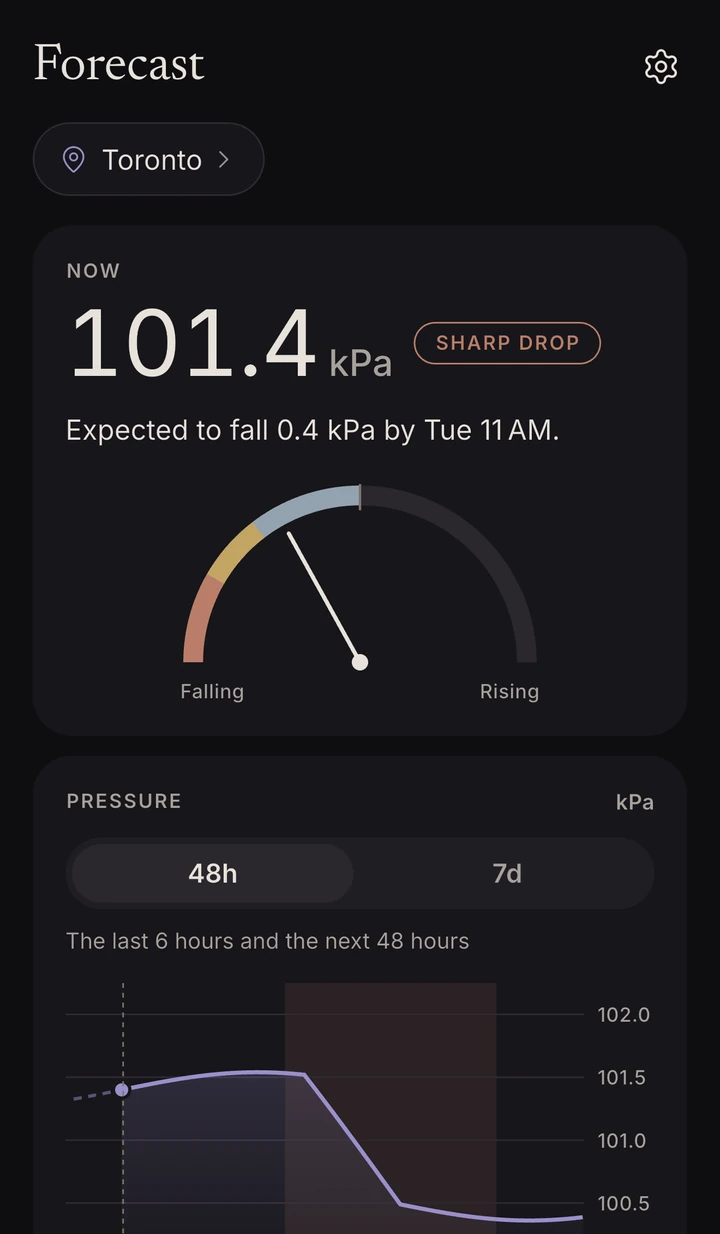
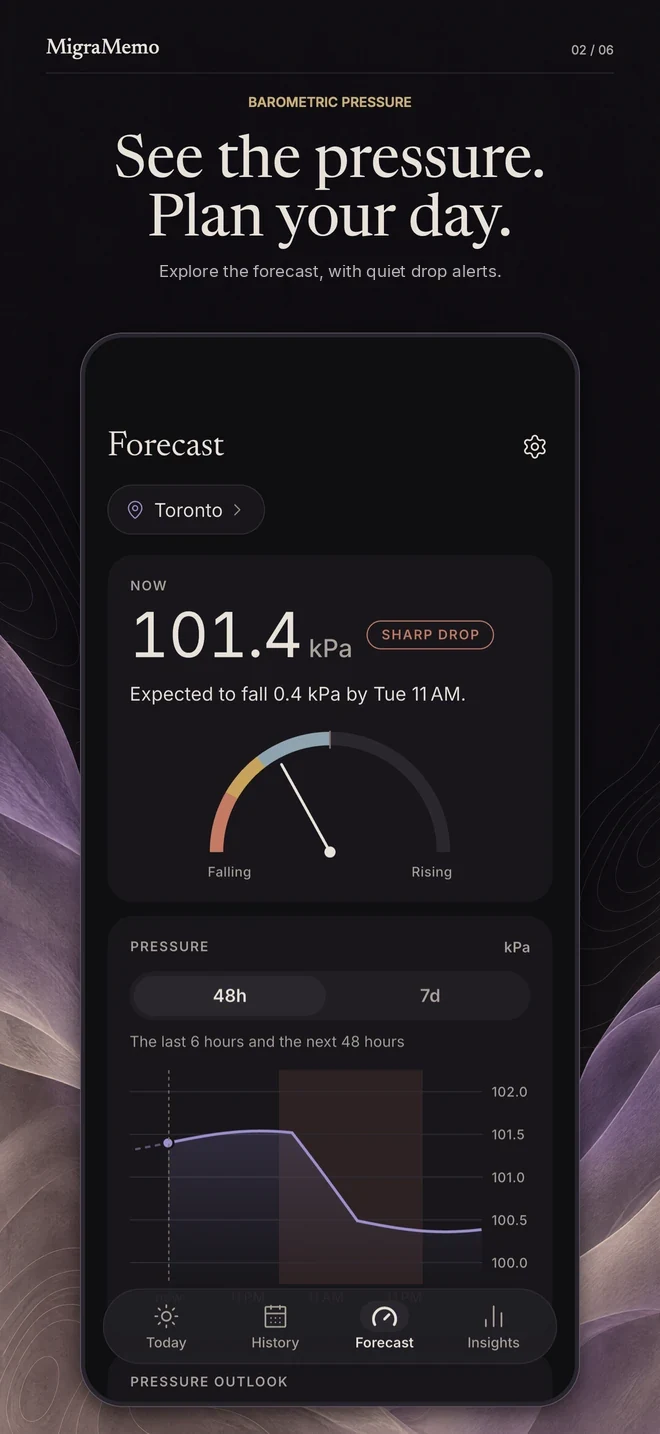
Many people log attacks around falling barometric pressure. MigraMemo watches the 7-day pressure forecast for your area and gives you a quiet, silent notification before sharp drops.

  • Heads-ups come only when the forecast shows a sharp drop. At most once a day, and never during your quiet hours.

  • Your area is stored rounded to roughly 11 km — never your precise position.

Forecast for Toronto: 101.4 kPa now with a Sharp drop label, expected to fall 0.4 kPa by Tuesday 11 AM, a gauge from Falling to Rising, and a 48-hour pressure chart with the drop period shaded.

What the air is doing

MigraMemo tells you what the air is doing, never what your body will do.

Heads-ups are environmental information, like a weather app.

Over the months

Your patterns, month by month

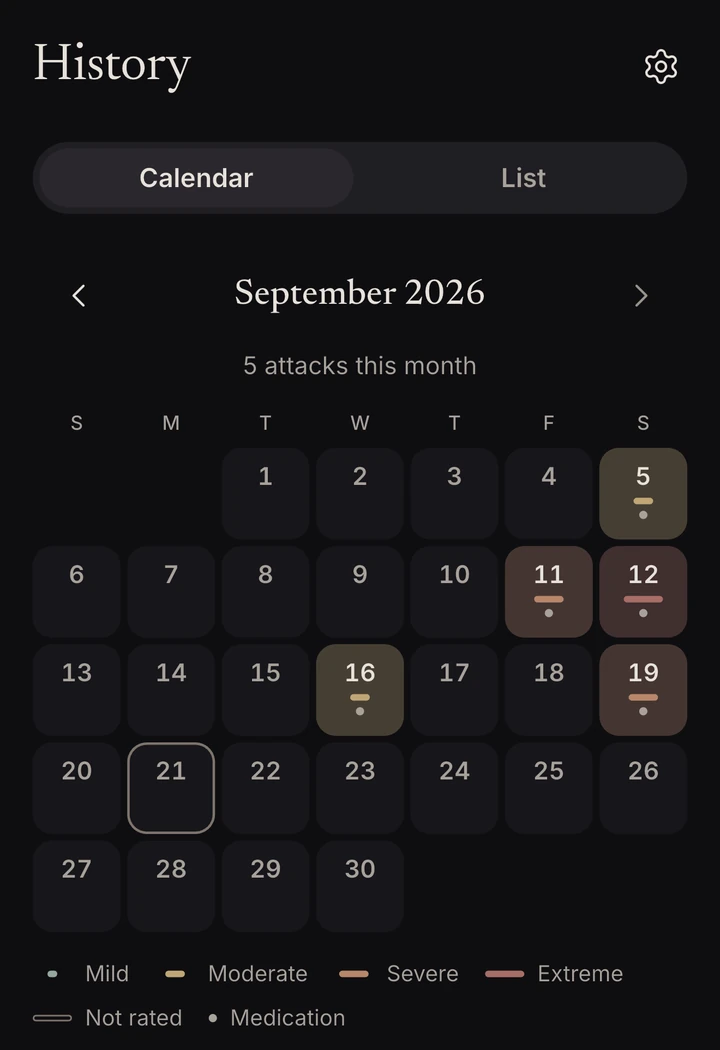
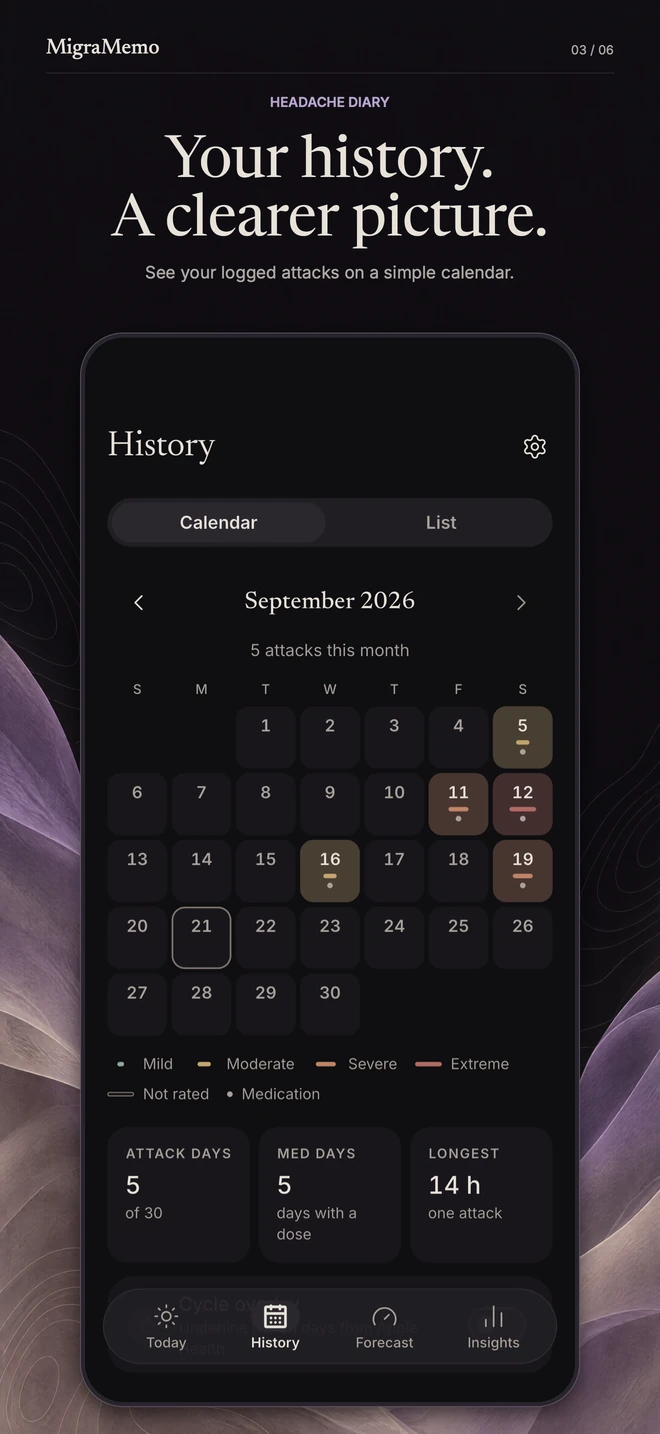
Every attack lands on the History calendar, each day a tile showing its severity tier, with a dot on days you took medication. However far back your diary goes, all of it is there.

History calendar for September 2026 with 5 attacks: the 5th, 11th, 12th, 16th and 19th tinted by severity with medication dots, today ringed, and a severity legend.

Your trends in plain numbers

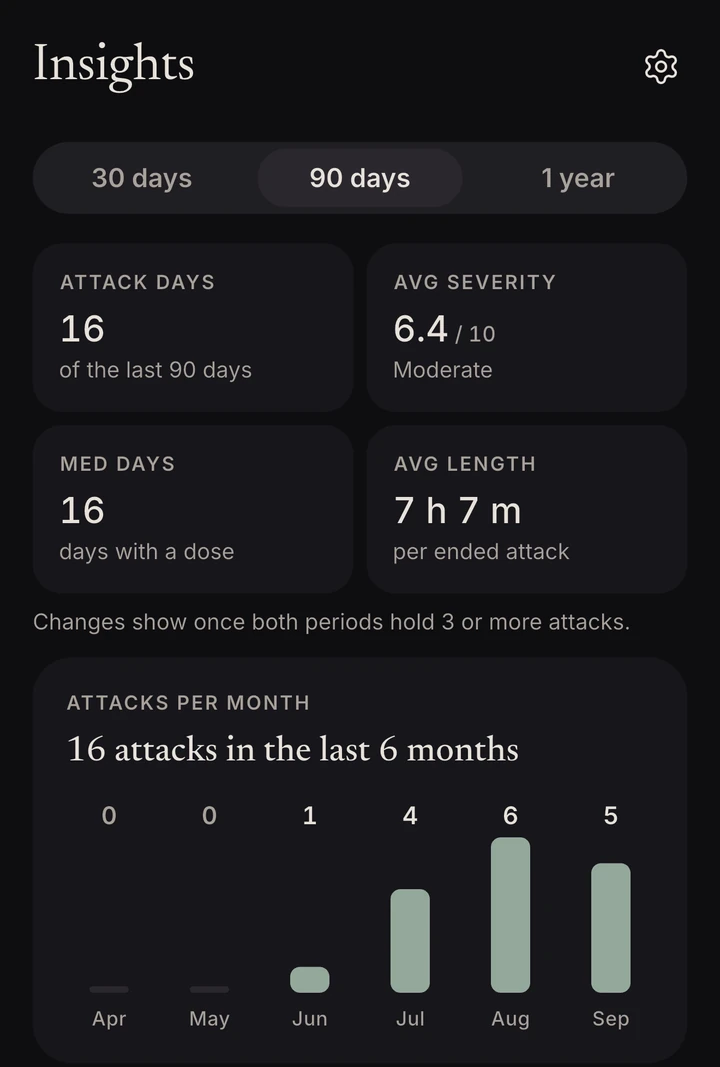
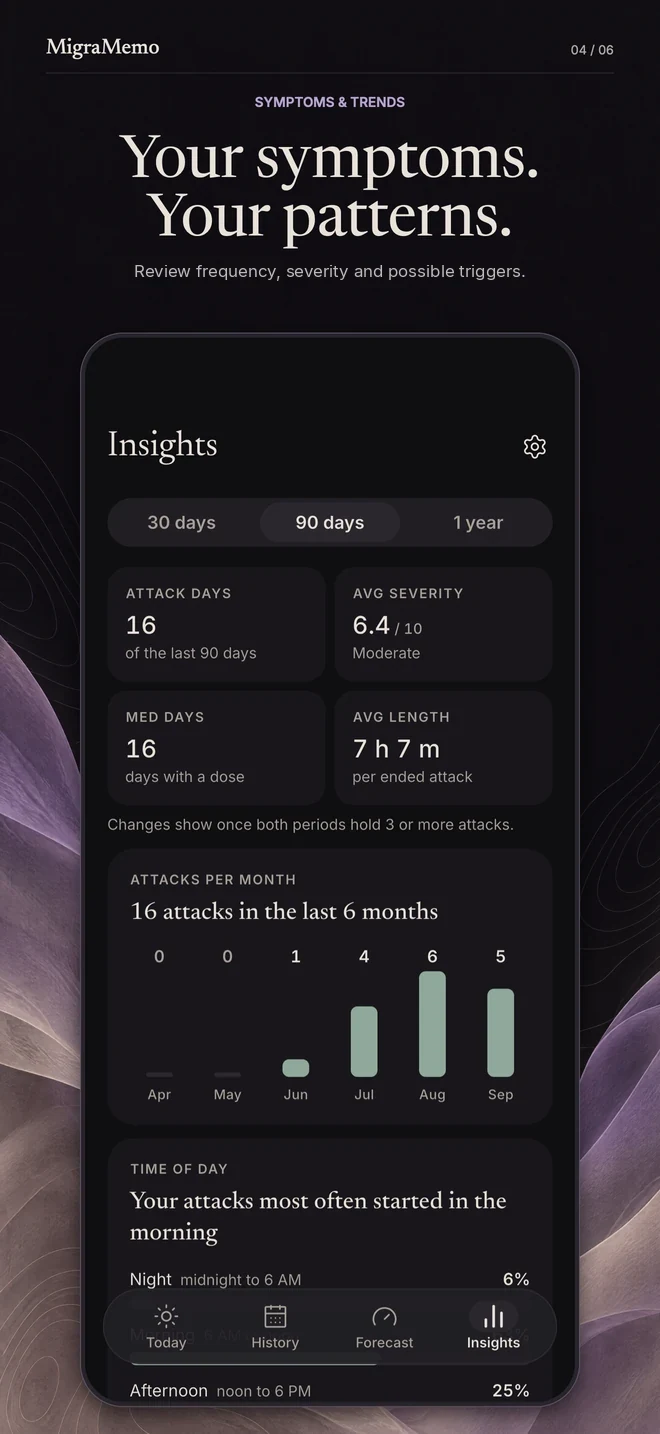
Attack days, average severity and average length over 30 days, 90 days or a year — plus how many attacks you logged each month.

Insights for the last 90 days: 16 attack days, average severity 6.4 of 10, Moderate, 16 medication days, average length 7 hours 7 minutes, and a bar chart of 16 attacks in the last 6 months.

At your appointment

Your last 1, 3 or 6 months

A report your neurologist can actually use

One tap builds a clean PDF of your last 1, 3 or 6 months:

  1. Attack frequency and duration
  2. Severity trends
  3. Your most frequent symptoms and suspected triggers
  4. A medication-response table
  5. Your MIDAS disability score

Bring it to your appointment instead of trying to remember.

MIDAS is the freely usable Migraine Disability Assessment: five self-reported counts of days. MigraMemo presents it as a score you can bring to your clinician — it does not diagnose.

Shared from your phone; nothing is uploaded.

And a few quieter details

  • Tap where it hurts.

    Mark where the pain is on a simple head map as you log an attack.

  • On your lock screen, only if you want it.

    Turn it on and an ongoing attack stays at hand, with Took med and End buttons — never medication names, severity or notes.

    iPhone: on your lock screen and in the Dynamic Island, where anyone who sees your phone can see it, with buttons on iOS 17 and later.

    Android: a silent notification whose details stay hidden while your phone is locked.

  • Cycle overlay.

    Reads your period days from Apple Health or Health Connect (read-only) to mark them on your attack calendar, plus an attacks-by-cycle-day view. That data is displayed in the moment and never stored by MigraMemo.

What MigraMemo is, and is not.

It does

  • Logs your attacks, symptoms, triggers and medication
  • Shows your own data back to you
  • Shows what the barometric pressure forecast is doing
  • Builds a PDF to bring to your appointment

It never

  • Diagnoses, predicts, treats or prevents anything
  • Gives medication recommendations or dosing advice
  • Stands in for medical care

Always consult a qualified clinician about your migraine treatment, and seek emergency care for sudden, severe, or unusual symptoms.

Privacy

No account.
Your diary.
Just your phone.

MigraMemo has no sign-up because it has no servers. Your attack history lives in a database on your phone, and you can export all of it to a file.

  • Your diary never reaches us.

    MigraMemo has no accounts and no backend. We cannot see, sell, or lose your data, because we never receive it.

  • It lives on your phone.

    Everything you log lives in a database on your device. On iPhone it is included in your normal iCloud device backup. On Android it is deliberately kept out of Google Drive backup so your diary never leaves the phone.

  • Yours to export.

    You can export your complete data as a file, or delete it at any time by deleting the app.

What does leave your phone

A few things do, and none of them is your health data: rounded coordinates to Apple Weather for forecasts, city-search text to Apple Maps, and what our purchase partner, RevenueCat, needs to run and analyse subscriptions and offers: your purchase and subscription status, when an offer is shown, and basic device details, tied to a random anonymous ID. This release does not send crash reports or anonymous usage counts. The privacy policy lists every one.

MigraMemo Unlimited

One plan, all of it.

No tiers and no locked screens. The whole app, for as long as you subscribe.

The diary

  • Unlimited attack logging
  • Unlimited history and the calendar
  • Symptoms and triggers
  • Medication logging
  • Insights: your trends in plain numbers
  • The pressure chart
  • The lock-screen tracker
  • Voice notes (iPhone)
  • Export all your data

Your diary stays on your phone, subscribed or not.

MigraMemo Unlimited

Yearly, with a 7-day free trial for eligible new subscribers, or monthly.

Everything in the diary, and the layers with real work behind them:

  • Pressure-drop heads-ups: A silent notice when barometric pressure is forecast to fall sharply in your area.
  • Medication patterns: How often each medication was logged as helping, from your own entries.
  • Cycle overlay: Period days marked on your attack calendar, read from your health app and never stored.
  • Doctor-ready report: A PDF of your diary with your MIDAS score, to bring to appointments.

Prices for your country are shown in the app.

Subscription terms

Questions

Plain answers.

More on the support page

Or write to support@migramemo.app. Every message is read.

Does MigraMemo predict my migraines?

No. MigraMemo shows what the barometric pressure forecast is doing — the same information a weather app shows. It never predicts or diagnoses anything.

Is MigraMemo a medical device?

No. MigraMemo is not a medical device and does not provide medical advice. It helps you track and spot patterns in your own data. It does not diagnose, predict, treat, or prevent anything, and it is not a substitute for medical care. Always talk to your clinician about your migraine treatment.

Where is my data?

On your phone, in MigraMemo’s own database. There is no account and no server. On iPhone it’s included in your normal iCloud device backup. On Android it’s deliberately kept out of Google Drive backup so your diary never leaves the phone.

Can I use MigraMemo without a subscription?

No. MigraMemo is subscription-only: MigraMemo Unlimited, monthly or yearly, with a 7-day free trial on the yearly plan for eligible new subscribers. If your subscription ends, your diary stays on your phone, ready when you subscribe again. To keep your own copy, export it from Settings → Export data while you’re subscribed. Prices for your country are shown in the app.

How do I move to a new phone?

On iPhone, restore your device backup as usual. On Android, a direct device-to-device transfer carries MigraMemo across (Android 12+); otherwise use Settings → Export data on the old phone and “Restore from a backup” on the new one’s welcome screen. Export/Import works on both platforms and is always the surest route.

How do I cancel MigraMemo Unlimited?

Through your Apple or Google account subscription settings; MigraMemo can’t see or manage your subscription.

When can I get MigraMemo?

MigraMemo is coming soon to the App Store and Google Play.

A closer look

A calmer way to keep track.

MigraMemo on iPhone, shown with fictional diary entries. Swipe or scroll to explore.

Your migraine history stays on your phone.

MigraMemo is coming soon to the App Store and Google Play.

  • Coming soon App Store
  • Coming soon Google Play

Missing something you need? Every message is read.

Tell us what’s missing